Unfriendly to the indie web
I have been experimenting with many software and hosting options for my personal website for around 2 years now, and I am still learning things bit by bit. One of the most pressing problems I encountered is that my domain is banned by my university.
I manage my domain with Cloudflare, and bearblog hosts my blog. It is a simple setup. I will go through how I got this figured out, but if you are encountering the same problem, you can skip straight to my "how to" section.
My venting
Whenever I access it on my university network, it's either the browser error message of certificate not valid, or a redirection to my university's generic blocked page, saying my website has been "identified as a potentially unsafe and may contain malicious content," and a link to email general IT helpdesk.
There is no specific reason given for why my website was blocked, so I tried to experiment with changes to settings on Cloudflare, changing hosting options, and see what pops up. The first roadblock I encountered when setting up my DNS with Cloudflare was a browser block, saying that my website is unsafe, and it is not using HTTPS, which is not true. I tried the "proceed to website (unsafe)" link, but it did not work. I checked the certificate my browser displayed, and it led me to CISCO Talos Intelligence.
From CISCO Talos Intelligence, my domain was listed as not categorized, and my reputation was neutral. I submitted a ticket to CISCO Talos requesting a reclarification for both the category and the reputation. They responded within a couple of minutes, saying that they have reviewed my ticket and adjusted as requested; however, they informed me that network admins were advised not to block a neutral reputation website. Apparently, my university decided to block all of them anyway.
It took a couple of hours after my ticket for the reclassification to take effect. After the reclassification, instead of the CISCO blocked page, my browser displayed the university's blocked page. I decided to surf around the bearblog community to see what happens with the other blogs. This is what I know:
- Older blogs with the bearblog dev subdomains are not blocked at my university. CISCO Talos Intelligent classifies bearblog dev as computer and internet, and reputation level neutral.
- Newer ones with the bearblog dev subdomains are blocked by CISCO Umbrella. It takes around 2-3 days before CISCO stops blocking newer blogs.
- Most blogs with custom domains are fine, but if they are not categorized with CISCO, they are blocked.
So the first roadblock is out, I managed to get through the not very useful blocking page by CISCO by submitting a ticket to them, asking for a reclassification and a categorization. I was at my university's block message. There is a link to Texas's Department of Information Resources guidelines, saying that they are protecting Texans from surveillance by Chinese technologies, so they must block TikTok, and a list of sites and technologies to be banned. It was absurd. I am definitely not Chinese, my content seems neutral, Bearblog is totally not Chinese, and Cloudflare is definitely not Chinese and malicious.
I submitted a ticket to my university's help desk stating that my website and domain do not fall into any of the banned categories, and request them to unblock my site. It took them 45 minutes to unblock it.
I am still not sure what makes my website banned from my university network, and others are not. It can be my address, as my physical address on Cloudflare is in Vietnam, and my billing address is not.
My university is blocking websites excessively, not because they are malicious, but because they are hosted by individuals.
How to know if it's CISCO
Check your certificate and see what your browser tells you. This is an example from a current trending blog post on bearblog. The website is currently blocked on CISCO network under CISCO Umbrella. If I check on CISCO Tallos, the domain is not categorized, and its reputation is unknown.
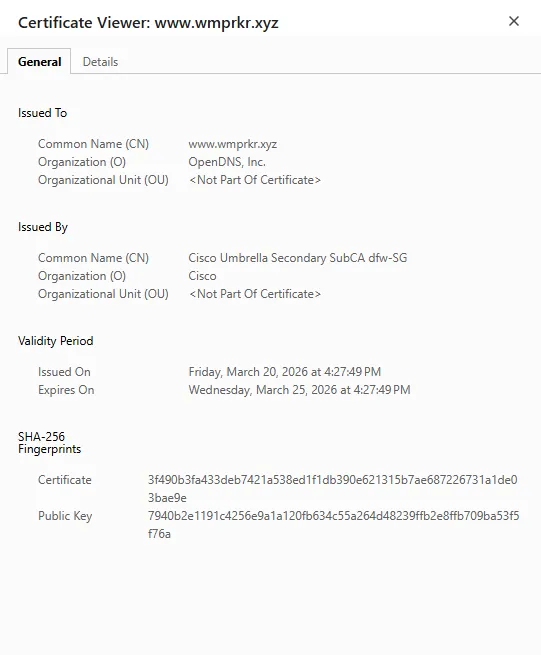
Usually, this should not be the problem. Still, if your network is strict like my university, you can create a CISCO account and submit a ticket to them, explaining and requesting to categorize and classify your domain.
What to do next from here
Usually, after this step, you are good. If your network still blocks your website, you may want to contact IT and ask them to unblock it manually. This is not an optimal solution, as it is case-by-case. If there is something that I missed, or you would add on how to make the indie web visible on networks like this, please let me know by emailing me hello [at] khoaly [dot] xyz.
Until next time,